
In MaxGalleria 7.2.5, galleries can now generate structured data (JSON schema) that helps search engines and AI tools better understand your galleries and albums.
This means your images, videos, and albums can be more easily discovered, categorized, and presented by search engines and AI-powered services.
- This feature is off by default
- You can enable it per gallery
- No coding required
What Does This Feature Do?
When enabled, MaxGalleria automatically adds a small, invisible block of data (called schema markup) to the page where your gallery appears.
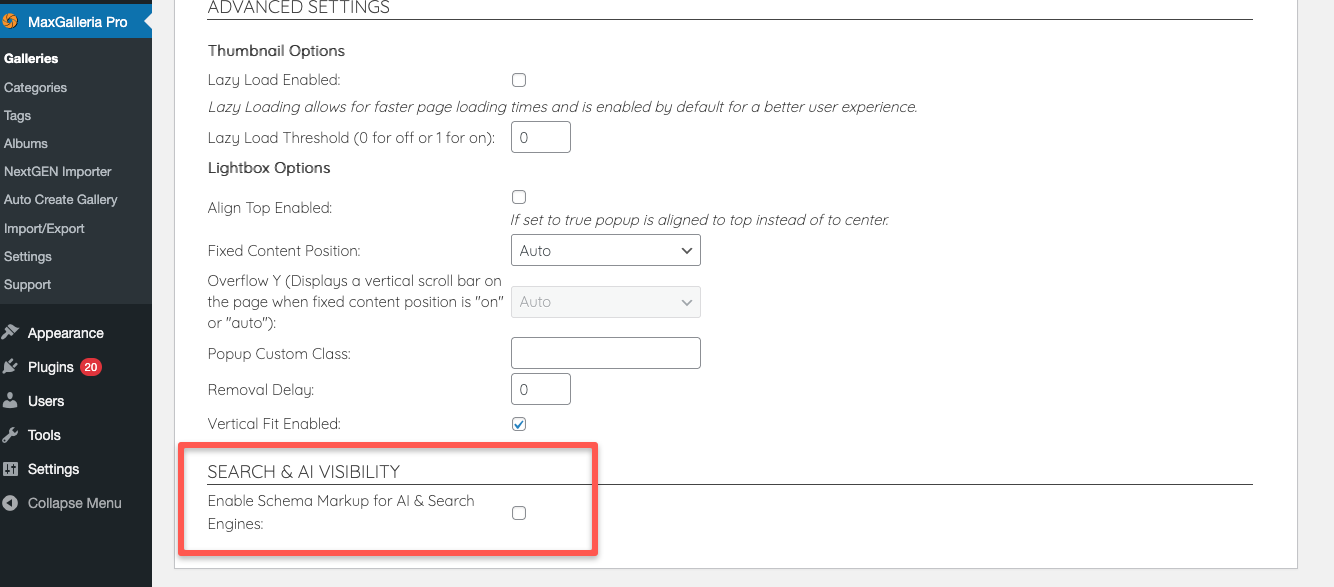
This data tells search engines and AI systems:
- What type of gallery it is (image or video)
- What images or videos it contains
- The gallery’s title and description
- The gallery’s layout or style
- The page URL where the gallery lives
Think of it as a clear label and table of contents for your gallery—made for machines, not humans.
Why This Matters for AI & Search Engines
Search engines and AI don’t “see” galleries the way people do. They rely on structured information to understand content correctly.
With schema enabled, your galleries can be:
- Better indexed by search engines
- More accurately interpreted by AI tools
- More likely to appear correctly in search results
- Easier to reference in AI-generated summaries
This is especially valuable as AI-powered search and assistants become more common.
How to Enable Schema Markup (Per Gallery)
- Edit the gallery you want to optimize
- Open Gallery Options
- Check “Enable Schema Markup for AI & Search Engines”
- Save the gallery
That’s it. The schema is generated automatically.
You can enable this on some galleries and leave it off on others—it’s fully flexible.
Best Practices for Best Results
To get the most value from this feature:
✔ Use clear gallery titles
Your gallery title becomes the main label for search engines and AI.
✔ Add meaningful descriptions
A short description helps explain the theme or purpose of the gallery.
✔ Write good image captions
Captions are used to describe individual images and videos.
✔ Enable schema only where it makes sense
Turn it on for important, public-facing galleries—not drafts or test galleries.
✔ Keep content accurate
Schema reflects your gallery’s content, so keep titles and captions up to date.
Safe, Clean, and Invisible
- The schema does not change how your gallery looks
- It does not add visible text
- All data is cleaned and sanitized
- You remain in full control
Summary
This new feature helps MaxGalleria galleries communicate clearly with search engines and AI, improving discovery while keeping everything simple and optional for you.
You can update directly through your WordPress Dashboard under plugins. If an update is not available you’ll need to log in to your account, renew any licenses where required and then recheck for the update in WordPress.